From four photos to a 3D beaver.
We reconstructed a small statue with Meshy 7.1, set its overall dimensions in Blender, and used Pixio to make two reaction videos. Here are the inputs, exact prompts, tools, and checks behind the result.
By League It To Beaver · Published October 10, 2026
AI-assisted production. One documented case study.
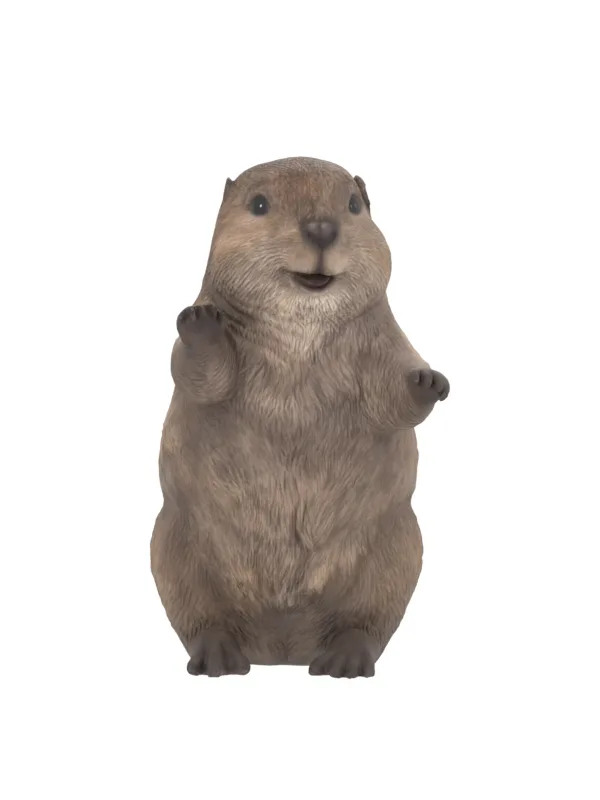
Can a photo become a 3D figurine? Yes, an image-to-3D model can estimate a figurine from a photo. We used four views of the same statue and a separate dimension diagram. Those extra views gave us visible evidence for its sides and tail. The diagram let us set overall scale. Hidden surfaces and small details still require estimates.
One mesh. Two reactions.
The 3D viewer rotates the static mesh in all directions. The videos animate pixels from one render. The GLB has no skeleton or animation tracks. The league's existing procedural trophy is a separate model with movable joints and champion plaques.
The mesh loads only when you ask for it. Drag to rotate. Use the wheel or buttons to zoom.
Select Play to watch a full action. Hold pose stops at the gesture for a closer look.
What the photos need to show.
Dylan supplied the Hi-Line Gift American Beaver Cub Standing Statue listing. Its gallery supplied front, back, left, and right views on white backgrounds. A separate diagram gave three dimensions: 20.8 cm high, 12 cm wide, and 23.7 cm deep, including the tail. We used the photographs for shape and the diagram for scale.
For your own figurine, capture all views in one session. Keep the object in the same pose. Use soft, steady light and a plain background. Show the whole silhouette, including thin parts and the base. Keep the camera near the object's middle height. Avoid wide-angle distortion, glare, motion blur, and portrait-mode blur.
- Take separate front, back, left, and right photographs. Put the clearest front image first.
- Keep enough resolution to inspect eyes, fingers, feet, and surface texture. Our saved references were about 1,200 pixels across.
- Record height, width, and total depth. State units. Specify whether tails, ears, hands, or a stand count in each measurement.
- For better inspection, also photograph the top, underside, and small details. Keep these for review if the chosen route accepts only four inputs.
- Place a ruler in the same plane as the part you measure. Keep that measurement photo separate from the clean shape inputs.
- Keep the originals. Do not use an AI-created reverse view as if it were a photograph of the real object.
Our source did not show the top or underside. It did not measure paw joints or internal construction. We can check the visible silhouette and overall bounds. We cannot certify the missing surfaces or a manufacturing tolerance from these inputs.
Which agents, models, and tools did what?
| Tool | Role in this run | Output |
|---|---|---|
| Codex coding agent | Inspected references, selected controls, wrote local scripts, and reviewed outputs. | Repeatable preparation, delivery, and browser code. |
| Chrome | Inspected the supplied product gallery and dimension diagram. | Four reference views and a dimension record. |
| Pixio + Meshy 7.1 | Ran pixio/multi-image-to-3d with all four views. | Textured GLB mesh. |
| Blender 5.2.1 LTS + Python | Set bounds, adjusted materials, and rendered the model. | Scaled GLB, editable Blender scene, eight views, neutral portrait, and scale report. |
| Pixio + MiniMax Hailuo 03 | Ran pixio/hailuo-03/image-to-video once per action. | Two fixed-camera video takes. |
| FFmpeg + FFprobe | Made silent delivery clips and checked every frame. | H.264 MP4 files and decode reports. |
| Three.js 0.186.1 + TrackballControls | Displayed the exported mesh in the browser. | Rotation and zoom on request. |
Codex coordinated the work. Meshy generated the geometry. Hailuo generated the video motion. This separation matters when you repeat the workflow: a chat model that writes Blender code is not the same model that estimates geometry from photographs.
Use a coding agent that can inspect images, read your repository rules, run Python and command-line tools, and verify the result in a browser. Keep one production record. Assign one stage at a time. An independent reviewer can inspect claims and likeness. More agents do not replace clear references or measured checks. We did not preserve an exact chat-model identifier in this media record, so we do not claim a specific chat model produced the geometry.
- Inspect reference views and record dimensions.
- Save identity features, known gaps, and permitted spending.
- Inspect the current API schema and exact quote. Submit the mesh job once.
- Save the unchanged GLB and job record.
- Calibrate and render the mesh in Blender. Review all eight views.
- Approve the neutral render as the identity input for motion.
- Submit one action per video. Use that same render at both ends.
- Inspect the raw takes before editing. Build and decode delivery clips.
- Check the public page on desktop and phone. Keep large assets behind explicit loading.
The exact mesh request.
We did not use a prose prompt to generate this mesh. The four photographs and these route controls were the input. Replace the four placeholders with authorized image URLs accepted by your provider.
{
  "image_urls": [
    "FRONT_IMAGE_URL",
    "BACK_IMAGE_URL",
    "LEFT_IMAGE_URL",
    "RIGHT_IMAGE_URL"
  ],
  "ai_model": "meshy-7.1",
  "geometry_resolution": "standard",
  "topology": "quad",
  "target_polycount": 30000,
  "texture_resolution": "2k",
  "symmetry_mode": "off",
  "should_remesh": true,
  "should_texture": true,
  "enable_pbr": true,
  "image_enhancement": true,
  "remove_lighting": true,
  "auto_size": false,
  "origin_at": "bottom"
}
These are the settings submitted in this run. They are a record, not a promise that all routes accept them. The current Meshy multi-image API documentation describes up to four views and gives the first image the primary front-view role for Meshy 7.1. It also labels symmetry_mode deprecated. We sent off, but we cannot attribute the uneven paw pose to that control.
We requested a 30,000-polygon, quad-dominant remesh. Blender counted 32,662 vertices and 51,621 faces after import. GLB export can triangulate faces and split vertices at texture seams. A requested polygon target is not the delivered count. Inspect the actual asset.
We enabled image enhancement in this run. For strict appearance matching, test it against disabled enhancement. The current API says disabled enhancement preserves the input without style processing. We have not run that comparison. The current documentation recommends disabling remesh for its highest-quality output. Our remeshed result served this website study; we have not measured whether it is the best possible reconstruction.
Save the generation identifier before polling. Download the completed asset and save its hash. Our first output URL returned 403. A read-only asset metadata request supplied a working URL. We retrieved the existing job rather than submitting another generation.
Set dimensions. Then check the shape.
The imported object used arbitrary bounds. Our Blender script applied its import transforms, centered it on the horizontal axes, and placed its lowest point on the ground. It then scaled each axis to the diagram's external bounds. In the preparation scene, X means width, Y means depth, and Z means height.
target_width_m  = 0.120
target_depth_m  = 0.237  # Includes the tail.
target_height_m = 0.208

scale_axis = target_axis / measured_mesh_axis
new_vertex = scale_axis * (old_vertex + centering_offset)
Each axis receives its own scale factor. That makes the bounds match the diagram, but it can change proportions within the object. Matching a bounding box does not prove the local anatomy is accurate.
The saved source bounds in X, Y, Z order were 0.961595, 1.884210, and 1.587028. The respective scale factors were 0.124793, 0.125782, and 0.131063. The calibrated bounds are 0.120 × 0.237 × 0.208 meters in that same order.
The source statue looks like painted resin. The generated material made the tail look metallic in the first render. We removed links feeding metallic and roughness inputs, set metallic to zero, and set roughness to 0.72. We preserved the base-color textures and UV coordinates. This was a visual material correction, not a new geometry generation.
We exported the selected mesh as GLB before adding the review camera and lights. Blender's glTF export uses Y-up coordinates; the browser viewer uses that exported orientation. The editable Blender scene stays in our local source archive.
The review scene uses three soft area lights, a white world, an orthographic camera, 24 Cycles samples, and denoising. The eight 600 × 800 renders use 45-degree steps. The 1,080 × 1,920 neutral portrait leaves space for raised paws. That portrait became the motion input.
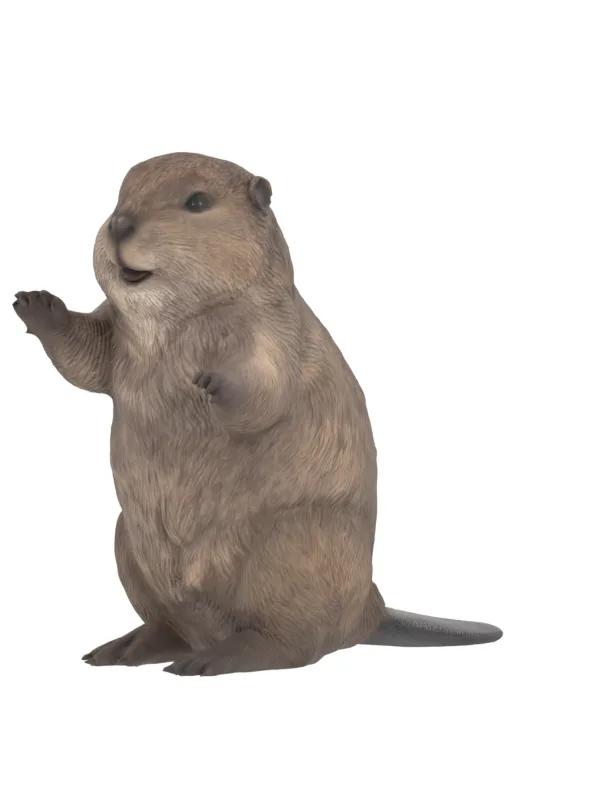
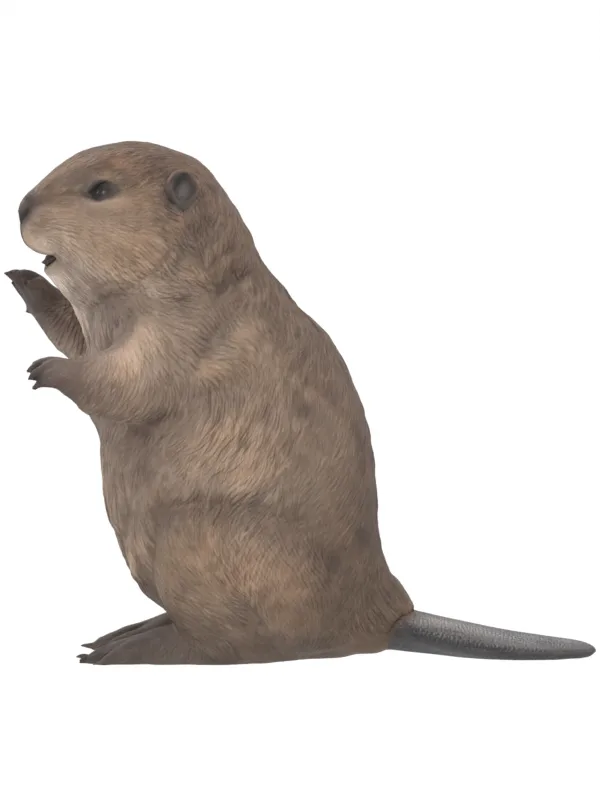
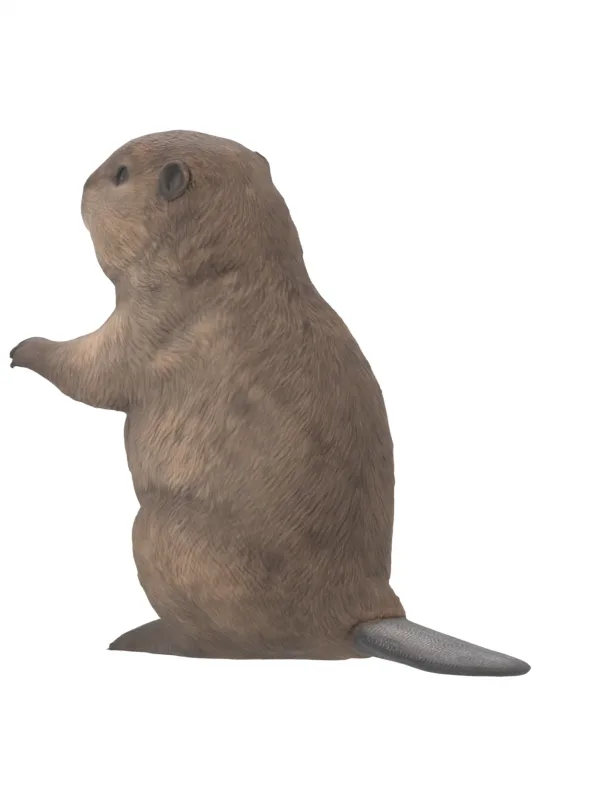
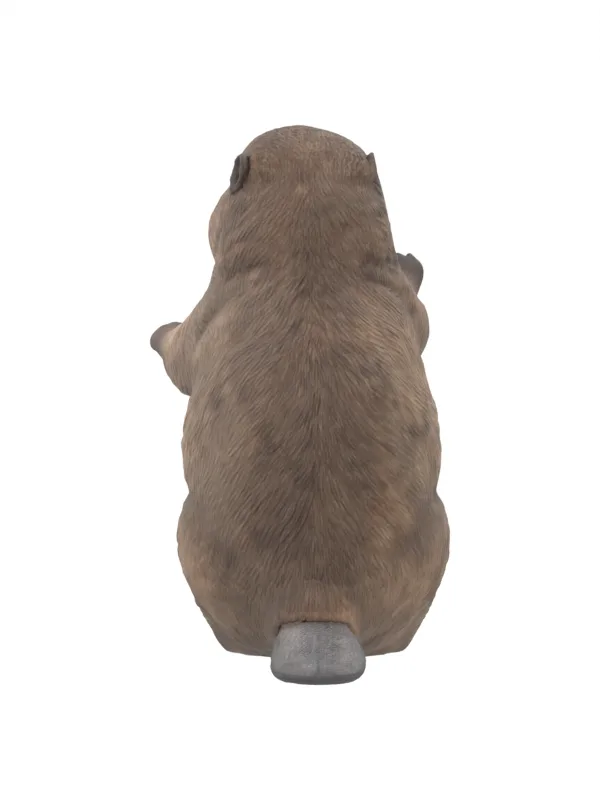
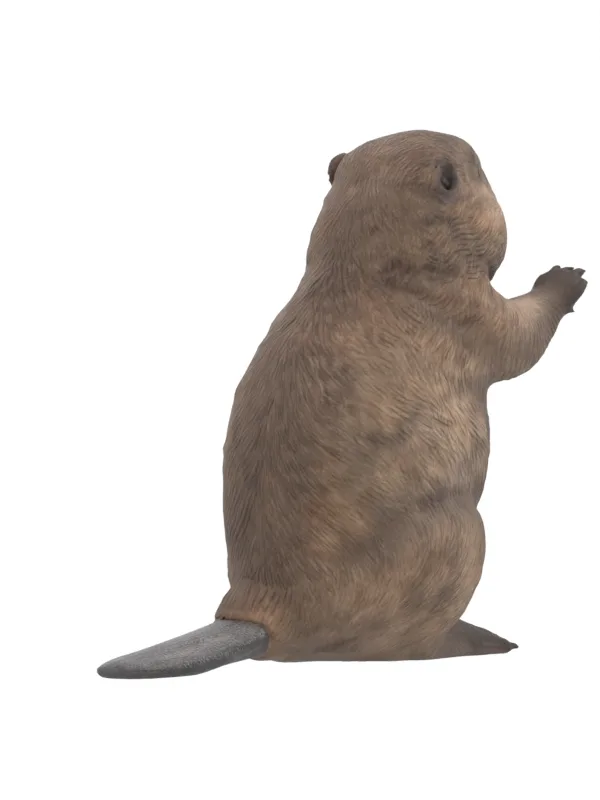
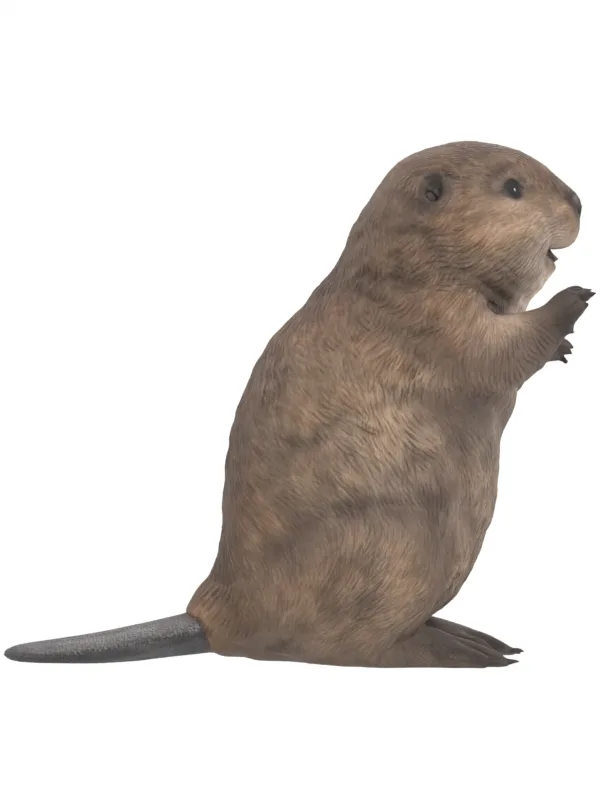
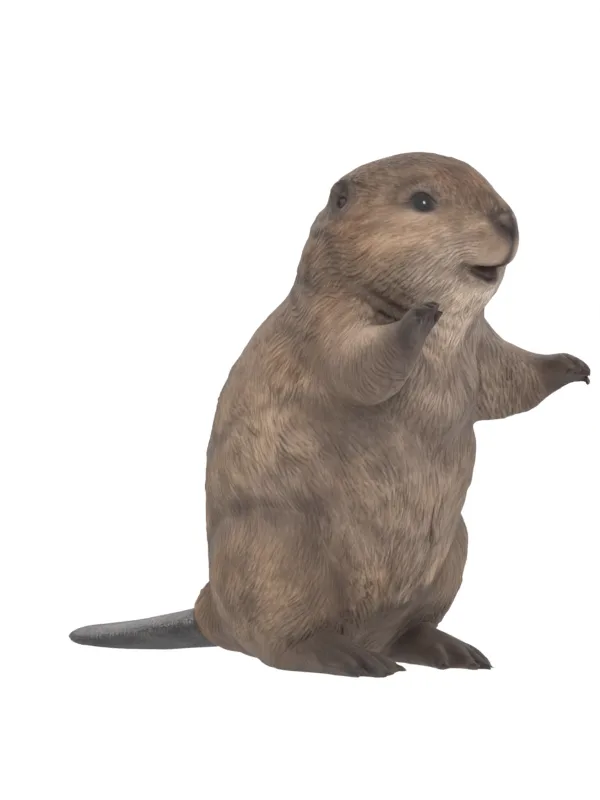
Eight angles of one mesh. Compare the silhouette and surface details against the source gallery, not only against the generated front render.
The exact animation prompts.
Both requests used the reviewed neutral render as image_url and end_image_url. We requested five seconds at 768P. The returned takes were 768 × 1,344 pixels at 24 frames per second, with 124 frames. Output dimensions and duration must be checked after generation.
{
  "image_url": "REVIEWED_NEUTRAL_RENDER_URL",
  "end_image_url": "REVIEWED_NEUTRAL_RENDER_URL",
  "duration": 5,
  "resolution": "768P",
  "prompt": "ONE OF THE EXACT PROMPTS BELOW"
}
Touchdown prompt
Bring this exact beaver statue to life as a carefully animated resin figure. Preserve its face, brown fur texture, small black eyes, small ears, muzzle, round belly, short limbs, paws and feet. Locked camera, white seamless background, constant size and framing. Only the arms and paw digits move. Keep the head, feet, belly and tail still. Keep the mouth in its original resting expression, with no speech or repeated jaw motion. No human hands, extra limbs, new props, text, lighting change, bouncing or camera movement. Start in the supplied neutral pose. End in the exact same supplied pose and hold still. Make one restrained touchdown celebration. From 0 to 0.5 seconds hold the neutral pose. Raise both short arms so both open paws are above its head in the American football touchdown signal. Hold that clear two-paw pose briefly from 1.5 to 2.5 seconds. Then lower both arms to their original uneven neutral pose by 4 seconds. Hold the original resting pose through the end. Keep the feet planted and body shape fixed.
Middle-finger prompt
Bring this exact beaver statue to life as a carefully animated resin figure. Preserve its face, brown fur texture, small black eyes, small ears, muzzle, round belly, short limbs, paws and feet. Locked camera, white seamless background, constant size and framing. Only the arms and paw digits move. Keep the head, feet, belly and tail still. Keep the mouth in its original resting expression, with no speech or repeated jaw motion. No human hands, extra limbs, new props, text, lighting change, bouncing or camera movement. Start in the supplied neutral pose. End in the exact same supplied pose and hold still. Make one clear middle-finger gesture with its already-raised right paw, on the viewer left. From 0 to 0.5 seconds hold the neutral pose. It curls the other digits into the paw and extends just its central middle digit upward, giving the viewer the finger. Hold the unmistakable rude gesture briefly from 1.5 to 2.5 seconds. Then lower that digit and uncurl the paw, returning to the original neutral paw pose by 4 seconds. Hold the original resting pose through the end. Preserve the beaver paw shape and dark claw details. The joke is the rude paw gesture on this otherwise innocent beaver.
Each prompt fixes identity, framing, and the moving body parts before it describes the action. It gives the action a short hold and specifies the return. That makes review concrete: paws above the head for touchdown; one central digit for the rude gesture; feet and face stable for both.
The prompt says to preserve the resting mouth. It does not guarantee that the video model will obey. We inspect the result for jaw motion, extra digits, new limbs, altered fur, shifting eyes, and camera drift. A successful API response only means a file was produced.
How we controlled quality.
Identity and geometry
Our identity checklist covers small black eyes and nose, short muzzle, small ears, light cheeks and throat, sculpted brown fur, round belly, uneven paws, low feet, and broad flat tail. We reviewed all eight mesh views. The feet and fine paw details are softer than the source. We retained these limits in the production record.
Raw motion
We saved both raw takes unchanged. We inspected dense frame sheets at six samples per second, plus individual gesture frames. We checked the full action, not just the best frame. Both takes show their intended gesture and return. Paw anatomy during movement is inferred. These are visual results from one example, not a quantified likeness benchmark.
Loop and delivery
The source takes included an audio stream. We removed all audio. The delivery script uses the first 120 frames at 24 fps. It resizes the 768 × 1,344 source to 432 × 768 to match the neutral portrait. This changes the aspect ratio by about 1.6 percent. The slight stretch is a delivery compromise, not a geometric measurement. It blends the first and last quarter-second over the neutral image, then adds a one-second resting hold at each end. Each full portrait loop is seven seconds and 168 frames.
FFmpeg decoded every delivery frame. FFprobe confirmed zero audio streams. The mean first-to-last RGB channel difference was 0.415 for the middle-finger clip and 0.433 for touchdown, on a 0–255 scale. The endpoints use the same neutral image before lossy encoding. This check measures the loop boundary; it does not prove accurate anatomy or good acting.
For this page, we cropped the 432 × 768 delivery frames to 432 × 620. We removed excess white space while retaining the raised paws and feet. The videos use H.264, YUV 4:2:0, and a fast-start container. They play on request, pause when hidden, and have download links. The 7 MB GLB loads only after you select Load 3D model. A still image remains available if WebGL cannot run.
Cost and records
Our Pixio account had an existing Maker plan. Each of the three submitted jobs received a live quote of zero expected credit debit. The source-linked ledger settled each at zero. The wrapper enforced zero per-job and session debit limits. We did not use a paid override. This is our run's billing record; it does not mean Pixio, Meshy, or Hailuo is free for every account.
Keep job IDs, exact inputs, route settings, prompt text, source hashes, raw outputs, scale reports, review notes, and delivery hashes together. Keep credentials, private billing details, and signed asset URLs out of public pages. Preserve source photographs in the local archive. This page publishes our reconstruction renders and delivery videos and links to the source listing.
A repeatable figurine workflow.
Start the coding agent with this brief. Replace the measurements and identity list for your own object. Give it authorized images and a clear budget.
Reconstruct this figurine from the supplied front, back, left, and right photos. Use the separate measurement record to set overall width, depth, and height. Preserve the listed identity features. Mark hidden surfaces as estimates. Inspect the current route schema and exact cost before generation. Save the original output and provenance. Prepare the mesh in Blender. Render eight views of the same mesh. Stop for shape review before generating motion. Then produce one requested action per take from the approved neutral render. Review the raw take, preserve it, and export a silent clip that returns to the same resting frame. Verify dimensions, frame decoding, browser playback, and phone layout. Record limits. Do not claim measured CAD accuracy or a skeletal rig unless those were actually built and checked.
The preparation script below is specific to this statue's dimensions. Edit its target bounds and camera for a new object. These source files run manually; the website build does not generate media.
blender --background --python prepare-statue.py -- raw.glb review
python3 build-statue-loop.py raw-action.mp4 review/neutral.png action-loop.mp4
The first command requires Blender. The second requires Python, FFmpeg, and FFprobe. The scripts do not submit API jobs. Use your own provider's supported submission tool for that stage. Our Pixio wrapper inspected the current schema, quoted the exact parameters, submitted once, polled the job, and saved the result. An API key belongs in a private environment file.
figurine-study/
  references/       # Original views and measurements.
  requests/         # Exact controls, prompts, quote, and job IDs.
  raw/              # Unchanged mesh and video outputs.
  review/           # Calibrated mesh, scene, views, and scale report.
  delivery/         # Web images, silent clips, and decode reports.
  production.json   # Identity, provenance, review, and known limits.
For motion from every camera angle, add a separate rigging stage. Build a skeleton, separate or weight the moving parts, define joint limits, and test deformation. Small fingers, a broad tail, and short arms need careful work. A video prompt does not perform that task. For a physical print, also check mesh closure, thickness, supports, and fit. We have not performed those print checks on this model.
If this reconstruction replaces the live trophy later, preserve the league's existing champion data. Keep the beaver, stand, and plaques in one rotating group. Plaque text needs its own legibility and data checks. Our photo-to-mesh study does not generate championship records.
Common questions.
Can I use just one photo?
A model can estimate a 3D shape from one photo. The parts outside that view are guesses. Our successful case used four photographs. We recommend real side and back views when likeness matters.
Does a ruler photo make it a CAD file?
A ruler or dimension diagram helps set scale. It does not measure every surface, joint, or tolerance. Our result is a calibrated photo-derived mesh.
Can the 3D beaver perform these video actions?
The current GLB is static. It rotates in the viewer. The reaction videos use a fixed camera. A mesh skeleton and tested animation tracks are a separate production step.
Can I use this for another small figurine?
Use the same sequence with photographs, measured dimensions, and an identity checklist for that figurine. Reflective, transparent, thin, or heavily occluded parts can require more reference work and manual repair. Judge each output against the actual object.
Which parts can I reproduce exactly?
The saved request settings, prompt text, dimensions, and local preparation are reproducible. Generative outputs can vary. API models and controls can change. Save the model identifier and date, inspect the live schema, and keep the raw asset.
Sources and production notes.
The production record and scripts support the measured results on this page. The following primary references explain the tools. Route availability and billing must be checked for each new job.
- Hi-Line Gift statue reference gallery.
- Meshy multi-image API documentation.
- Blender glTF import and export manual.
- FFmpeg filter documentation.
- Three.js documentation.
This guide describes our October 10, 2026 run. It records a tested workflow and its limits. It does not promise a particular likeness, cost, or search ranking.